2021.09.15
Web Worker
js
💡 概述
Web Worker 提供了在后台线程中运行脚本的能力,不会阻塞主线程的执行。这使得网页可以保持响应,同时执行计算密集型任务。
当页面中存在动画效果时,如果同时执行复杂的计算任务,会导致动画出现卡顿或者不流畅的情况。
因为计算任务会占用主线程资源,从而影响动画的渲染性能。
这时候,Web Worker 就能完美解决这个问题。通过将耗时的计算任务放在独立的线程中执行,可以让主线程专注渲染,确保页面动画的流畅性。
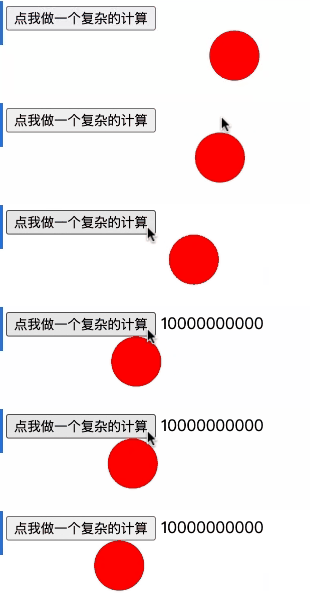
原来代码
<!DOCTYPE html>
<html lang="en">
<head>
    <meta charset="UTF-8">
    <title>Title</title>
    <style>
        .ball {
            width: 50px;
            height: 50px;
            background-color: red;
            border-radius: 50%;
            position: absolute;
            left: 0;
            transition: left 1s;
        }
    </style>
</head>
<body>
<button>点我做一个复杂的计算</button>
<div class="ball"></div>
<!-- 让球动起来 -->
<script src="../../../todo/demo/run.js"></script>
<script>
    const btn = document.querySelector('button')

    btn.onclick = () => {
        let count = 0
        for (let i = 0; i < 10 ** 10; i++) {
            count += 10
        }
    }

</script>
</body>
</html>
使用 worker 后
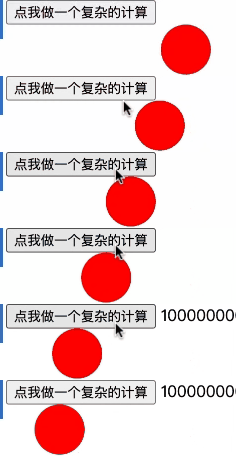
<!DOCTYPE html>
<html lang="en">
<head>
    <meta charset="UTF-8">
    <title>Title</title>
    <style>
        .ball {
            width: 50px;
            height: 50px;
            background-color: red;
            border-radius: 50%;
            position: absolute;
            left: 0;
            transition: left 1s;
        }
    </style>
</head>
<body>
<button>点我做一个复杂的计算</button>
<div class="ball"></div>
<script src="../../../todo/demo/run.js"></script>
<script>
    const btn = document.querySelector('button')
    const worker = new Worker('./woker.js')
    btn.onclick = () => {        let count = 0        for (let i = 0; i < 10 ** 10; i++) {            count += 10        }    }
    btn.onclick = () => {        worker.postMessage({            type: 'run'        })     }    worker.onmessage = (e) => {        if (e.data.type === 'run-success') {            console.log(e.data.count)         }    }</script>
</body>
</html>
// worker.js
globalThis.onmessage = (e) => {
  if (e.data.type === 'run') {
    let count = 0
    for (let i = 0; i < 10 ** 9; i++) {
      count += 10
    }
    globalThis.postMessage({ type: 'run-success', count })
  }
}