2026.01.18
createApp -> Vue 应用的初始化与挂载机制
在前面的章节中,我们实现了 render 函数来渲染虚拟节点。然而,Vue 的实际使用中更常见的是 createApp API。本章将深入
createApp 的实现原理,理解它如何封装渲染逻辑,并提供更友好的应用级 API。
在前面的章节中,我们实现了 render 函数来渲染虚拟节点。然而,Vue 的实际使用中更常见的是 createApp API。本章将深入
createApp 的实现原理,理解它如何封装渲染逻辑,并提供更友好的应用级 API。
从 createRenderer 说起
createRenderer 的完整返回值
回顾我们之前实现的 createRenderer,它的返回值不仅仅是 render 函数,还包括 createApp:
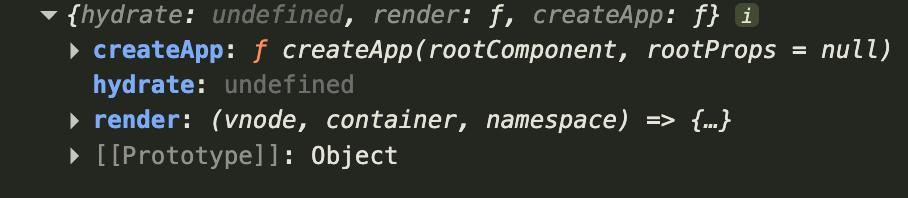
createApp 的使用方式
让我们先回顾一下 createApp 在实际开发中的典型用法:
<!DOCTYPE html>
<html lang="en">
<head>
    <meta charset="UTF-8">
    <title>createApp</title>
</head>

<body>
<div id="app"></div>
<script type="module">
    import {h, createApp} from '../dist/vue.esm.js'

    const Comp = {
        render() {
            return h('div', 'hello')
        }
    }

    createApp(Comp, {message: 'msg'}).mount('#app')
</script>
</body>
</html>
设计思路分析
createApp 与 render 的关系
思考一下:createApp 的 mount 方法本质上做了什么?
它将组件渲染到容器中,这不正是 render 函数的职责吗?
// render 函数的作用
render(vnode, container) // 将虚拟节点渲染到容器中

// createApp 的作用
createApp(component, props).mount(container) // 将组件挂载到容器中
因此,createApp 是对 render 的高层封装,提供更完善的应用管理能力。
架构设计
在 createRenderer 中,我们这样组织代码:
export function createRenderer(options) {
  const render = (vnode, container) => {
    // 渲染逻辑
  }

  return {
    render,
    createApp: createAppApi(render)
  }
}
设计要点:
- 依赖注入:
createAppApi接收render函数作为依赖 - 关注点分离:
createAppApi专注于应用级 API,不关心渲染细节 - 函数工厂:
createAppApi返回createApp函数
实现 createAppApi
核心实现
在 packages/runtime-core/src/apiCreateApp.ts 中创建 createAppApi 函数:
/**
 * 创建 createApp 函数的工厂
 * @param render - 渲染器的 render 函数
 * @returns createApp 函数
 */
export function createAppApi(render) {
  /**
   * 创建应用实例
   * @param rootComponent - 根组件对象
   * @param rootProps - 根组件的 props
   * @returns 应用实例对象
   */
  return function createApp(rootComponent, rootProps) {
    const app = {
      _container: null, // 保存挂载的容器引用

      /**
       * 挂载应用到指定容器
       * @param container - DOM 容器元素
       */
      mount(container) {
        // 1. 将组件转换为虚拟节点
        const vnode = createVNode(rootComponent, rootProps)

        // 2. 调用 render 函数渲染虚拟节点
        render(vnode, container)

        // 3. 保存容器引用,用于 unmount
        app._container = container
      },

      /**
       * 卸载应用
       */
      unmount() {
        // 渲染 null 来卸载所有内容
        render(null, app._container)
      }
    }

    return app
  }
}
unmount 方法的实现原理
为什么 render(null, container) 可以卸载?
在我们的渲染器实现中,当新节点为 null 时会触发卸载逻辑:
// 在 patch 函数中
if (vnode == null) {
  if (container._vnode) {
    unmount(container._vnode) // 卸载旧节点
  }
}
增强 mount 方法:支持 CSS 选择器
问题场景
当前的实现有一个限制:
// ✅ 可以工作
const el = document.querySelector('#app')
app.mount(el)

// ❌ 会报错
app.mount('#app')
但在实际使用中,我们希望像 Vue 官方那样直接传入选择器字符串。
解决方案:平台特定的封装
架构约束:
runtime-core是平台无关的,不能直接操作 DOMruntime-dom是浏览器平台特定的实现
因此,我们需要在 runtime-dom 中对 createApp 进行增强。
在 runtime-dom 中增强
在 packages/runtime-dom/src/index.ts 中:
import { createRenderer } from '@vue/runtime-core'
import { isString } from '@vue/shared'
import { nodeOps } from './nodeOps'
import { patchProp } from './patchProp'

export * from '@vue/runtime-core'

const renderOptions = { patchProp, ...nodeOps }
const renderer = createRenderer(renderOptions)

/**
 * 浏览器平台的 render 函数
 */
export function render(vnode, container) {
  renderer.render(vnode, container)
}

/**
 * 浏览器平台增强版的 createApp
 * 支持 CSS 选择器作为挂载目标
 */
export function createApp(rootComponent, rootProps) {
  // 1. 调用 runtime-core 的 createApp
  const app = renderer.createApp(rootComponent, rootProps)

  // 2. 保存原始的 mount 方法
  const _mount = app.mount.bind(app)

  // 3. 覆盖 mount 方法,增加选择器支持
  function mount(selector) {
    let container = selector

    // 如果是字符串,当作 CSS 选择器处理
    if (isString(selector)) {
      container = document.querySelector(selector)

      if (!container) {
        console.warn(`Failed to mount app: mount target selector "${selector}" returned null.`)
        return
      }
    }

    // 调用原始 mount 方法
    _mount(container)
  }

  // 4. 替换 mount 方法
  app.mount = mount

  return app
}

export { renderOptions }
分层设计的优势
通过这种分层设计,我们获得了:
1. 平台无关性
// runtime-core: 纯逻辑,不依赖浏览器 API
export function createAppApi(render) {
  return function createApp(rootComponent, rootProps) {
    // ...
  }
}
2. 平台特定增强
// runtime-dom: 浏览器特定功能
export function createApp(rootComponent, rootProps) {
  const app = renderer.createApp(rootComponent, rootProps)
  // 增强 mount 方法
}
3. 可扩展性
如果要支持其他平台(如小程序、Native),只需:
- 复用
runtime-core - 创建新的
runtime-xxx - 实现平台特定的
nodeOps和createApp增强
完整代码汇总
apiCreateApp.ts (runtime-core)
/**
 * 创建 createApp API 的工厂函数
 * 平台无关的应用实例管理
 */
export function createAppApi(render) {
  return function createApp(rootComponent, rootProps) {
    const app = {
      _container: null,

      mount(container) {
        // 组件 -> 虚拟节点 -> 渲染
        const vnode = createVNode(rootComponent, rootProps)
        render(vnode, container)
        app._container = container
      },

      unmount() {
        // 渲染 null 触发卸载
        render(null, app._container)
      }
    }

    return app
  }
}
index.ts (runtime-dom)
/**
 * 浏览器平台的 createApp 增强
 * 支持 CSS 选择器作为挂载目标
 */
export function createApp(rootComponent, rootProps) {
  const app = renderer.createApp(rootComponent, rootProps)
  const _mount = app.mount.bind(app)

  function mount(selector) {
    let container = selector
    if (isString(selector)) {
      container = document.querySelector(selector)
      if (!container) {
        console.warn(`Failed to mount app: mount target selector "${selector}" returned null.`)
        return
      }
    }
    _mount(container)
  }

  app.mount = mount
  return app
}
总结
至此,我们完成了 createApp 的核心实现,为后续的组件等奠定了基础。这个应用级 API 将成为整个 Vue
应用的入口点。